To watch NHL Network, choose a television or streaming subscription that explicitly includes NHL Network, then open that provider's live channel guide. A service can carry plenty of NHL games without carrying this particular channel. That distinction matters most when a game or a studio show you want is listed on NHL Network.
This guide focuses on getting the channel, rather than finding every hockey broadcast. Provider information was checked on . Packages and offers can change, so the lineup for your address and the final checkout should settle your purchase.
What you need to watch NHL Network
Start with the channel name printed beside the broadcast. NHL Network is a television channel with games and studio coverage. NHL Center Ice is an out-of-market game package, and the NHL app is a league app. These names describe different things. Searching your television for "NHL" can bring up clips, a team page, a game package or a paid channel; check which result you actually selected before subscribing.
You need three pieces to work together: a provider that carries the channel, a package on your account that includes it, and a supported way to watch that account. Having two of the three is not enough. For example, a streaming app may open perfectly on your television while NHL Network remains locked because the sports add-on has not been purchased. Conversely, an active subscription will not help if the television is signed into a second account.
If you already pay for television, first search the provider's guide for the exact channel. Open it rather than assuming a visible logo proves access. A channel can appear in a guide as an upgrade option. If playback asks you to change packages, inspect the account's channel list and the cost of the required upgrade. This small test can prevent you from buying an unnecessary second service.
For a new subscription, write down what you want: an occasional NHL Network game, regular studio coverage, or a wider mix of national and local hockey. Those are different shopping lists. A package that solves the Network requirement may still leave another broadcaster missing. Our complete NHL viewing guide helps with that larger question.
A practical household check is to ask one person to name the desired show or matchup and another to verify the actual channel entitlement. This avoids buying around an advertising phrase such as "watch hockey all season." For Network-specific viewing, the deciding evidence is the channel's presence in the purchased lineup. Save the package confirmation and test a current program while you still have time to ask support about an error.
Write the full channel name beside the show you want, then match it to the package confirmation. If the confirmation only names a general hockey package, open its channel list before paying. This makes the purchase about the broadcast you intend to watch.
Does YouTube TV have NHL Network?
NHL Network is not currently listed on YouTube TV. The channel comparison published by CableTV reports that it is absent from the base package, Sports Plan and Sports Plus. YouTube TV's own hockey landing page promotes other national networks. Check the current lineup before making a new purchase, because channel agreements can change.
NHL games on YouTube TV are a different promise
A hockey advertisement can be accurate without promising NHL Network. Think of the league as the sport being covered and the Network as one particular channel carrying some coverage. When a matchup is on a channel included in your YouTube TV package, that broadcast may be available there. When the listing says NHL Network, a general promise of NHL coverage is not enough to establish access.
Use YouTube TV's location and network instructions to inspect the lineup for your home. Search for the full channel name, not just "hockey." Also distinguish an included network from an add-on offer. If NHL Network is missing, adding a sports package without checking its contents can increase the bill without solving the problem.
For a household already happy with YouTube TV, the decision is whether the missing channel matters enough to justify another subscription or a switch. Count the specific broadcasts you expect to use. Someone wanting occasional studio clips may make a different choice from a fan watching the linear channel most evenings. Do that comparison before canceling a service that already meets other household needs.
Free YouTube clips do not unlock the live channel
The official NHL Network YouTube channel is another source of confusion. A posted interview or analysis clip is a separate viewing experience from the complete scheduled channel. Subscribing to a YouTube channel means following its uploads; it does not purchase a television package. YouTube Premium and YouTube TV are also different products.
Check the video title and format before deciding you have found a live broadcast. A preview, an archived segment and a current television program can all appear in search results together. For the full live channel, return to a provider whose paid lineup explicitly names NHL Network. For a short segment, the official upload may already answer your question without any change to your television subscription.
If you are searching on a television, read the app name as carefully as the video title. The ordinary YouTube app and the YouTube TV app can sit beside each other on the same home screen. Following an official upload is useful for clips; it does not change the paid channel lineup attached to another service.
Compare NHL Network access routes
There are two useful starting points: upgrade a television service you already use, or compare a new live-TV streaming service. The best route depends on your existing bill and desired channels. A small addition to an existing package can be simpler than another account, while a new streaming subscription may suit a household that no longer uses cable.
| Verified example | What to check | Useful detail |
|---|---|---|
| Sling | Base plan plus the required sports package | Its hockey page advertised NHL Network starting at $56.99 per month on October 11. |
| Xfinity | TV Premium or More Sports & Entertainment | Its official NHL page lists these as Network access routes. |
| DIRECTV | Your particular satellite or streaming package | Its official channel guide identifies NHL Network as channel 215. |
Read the Sling hockey offer and the Xfinity NHL page before comparing checkout totals. These are verified examples, not a complete list of every provider. Availability and package names can vary; a national brand name does not prove that every plan includes the channel.
Check the complete package price before subscribing
Separate the advertised starting number from the amount your household will actually pay. Write down the base subscription, the required sports add-on, any equipment you need, taxes or other displayed fees, and the renewal price. If an offer is introductory, note its end date. A package described as inexpensive can become less attractive when another required layer is added.
Then compare the added cost, not just the total bill. Suppose you already pay for a service that can unlock Network with an upgrade. Compare that upgrade with the full cost of a second subscription. Alternatively, if you would replace your existing service entirely, list the other channels and household features you would lose. That is a different calculation from adding one hockey channel.
Do not choose solely from a free-trial headline. Read who qualifies, what payment is required, and when the first charge occurs. A short trial might be useful for testing a television app, but it is not a season-long viewing plan. Keep a reminder tied to the displayed billing date and save the confirmation screen. These steps make a provider comparison useful after the advertisement has changed.
Keep your comparison in one currency and one billing period. An add-on billed each month and a discounted first-month television offer cannot be compared fairly as if both were permanent prices. For a season-long plan, use the normal renewal amount in your estimate and treat any introductory saving as a separate line.
Find NHL Network on your television or streaming guide
On a conventional television guide, search the channel name or use your provider's current directory. DIRECTV's official listing identifies channel 215 HD. Do not transfer that number to a different provider. A streaming guide may use channel names and favorites rather than a familiar cable number.
Use your provider and ZIP code
The NHL Network channel finder asks for your ZIP code and provider. Use the information for the place where you intend to watch. Once you find the channel, compare it with the guide attached to your own account. A provider can carry a channel somewhere without including it in your particular package.
Add the channel to favorites after confirming playback. Then search for the actual program or matchup. Check the date and time zone: a channel listing, a studio-show start and a game's opening faceoff are not necessarily the same time. If you plan to record, choose the correct airing and inspect how your provider handles schedule changes or a broadcast that runs long.
Set up the device you will actually use
For streaming, begin with your provider's supported-device information and official app-store link. Match the television model or streaming device, rather than assuming that all smart TVs use the same apps. A brand name alone may not settle support for an older model. If you cannot find the app, investigate compatibility before paying for extra equipment.
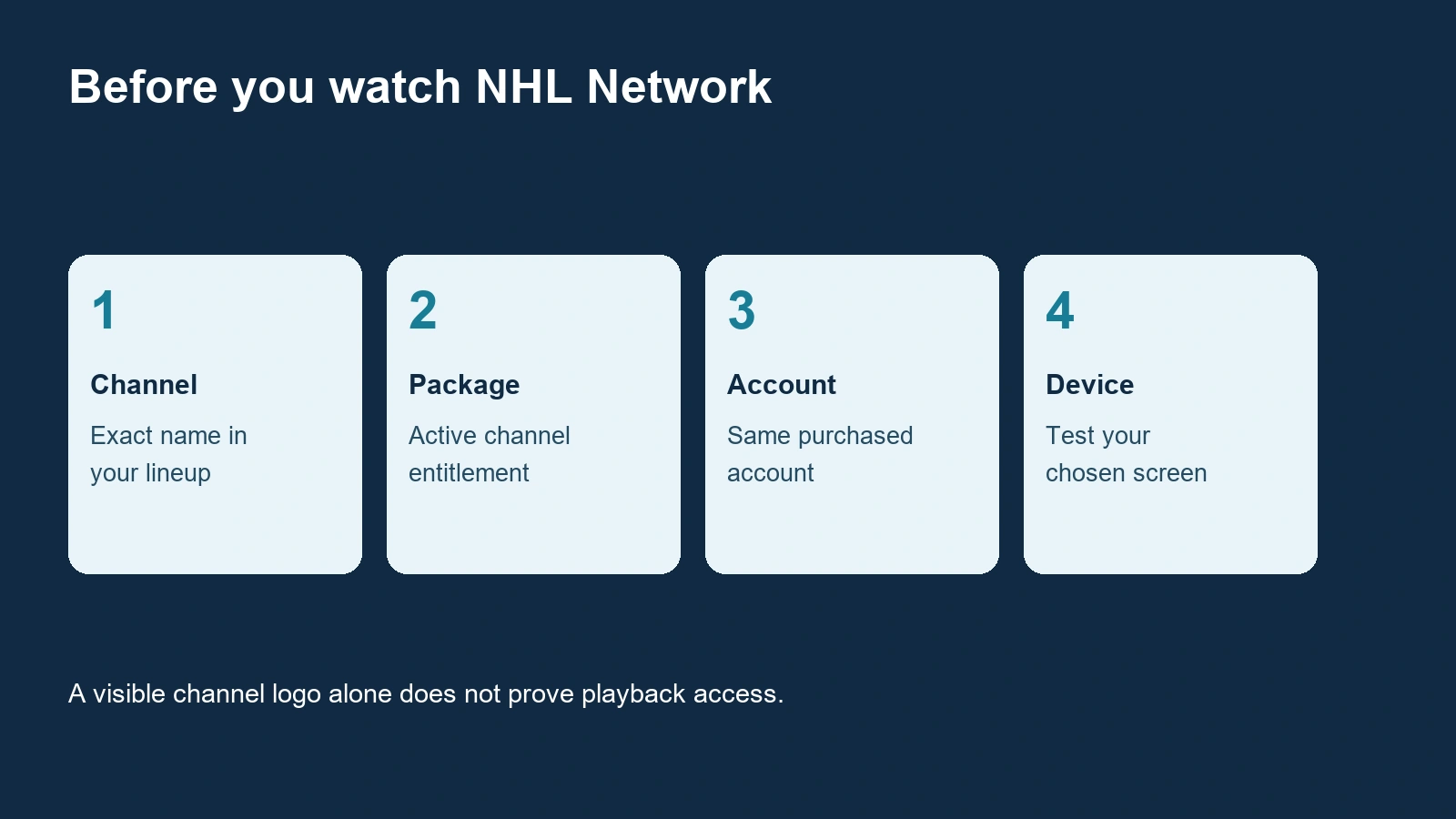
Sign in with the account that holds the subscription. If the app displays an activation code, use the provider's official instructions and complete authorization with that same account. Installing a league app instead of the provider app will not repair a missing television entitlement. Keep the subscription confirmation available so you can compare the purchased account with the account shown on the television.
Finally, play an available program on the intended screen. Check sound, picture and remote-control navigation while there is no rush. Test another screen only as a diagnostic comparison: if the channel works on your phone but not your television, you have narrowed the issue to the device or app session. If it is locked everywhere, return to the account's package and entitlement.
A television test should include finding the channel again after closing the app. Save it as a favorite if your provider allows that, and show another household viewer where it lives in the guide. This is especially helpful when the streaming app has both a sports homepage and a separate live-channel menu.
Why an NHL game can still be unavailable
Being able to open NHL Network does not establish access to every hockey game in every location. A sports blackout concerns a particular broadcast right. A missing subscription concerns your account. A broken app concerns delivery. These problems can look similar on a television, but they call for different next steps.
The NHL says regional games carried by NHL Network outside local markets are unavailable on ESPN+. If you normally use ESPN+ for an out-of-market team, check the listed broadcaster when a game disappears. Repeatedly refreshing the ESPN app will not add a right carried elsewhere.
Start with today's NHL games and identify the exact matchup. The date matters, especially if you are watching after midnight or traveling between time zones. Compare the listing with the provider's guide. A studio program discussing a game is not the same thing as its complete live broadcast, and a replay listing does not necessarily identify the live rights.
Then read the error literally. A message asking you to upgrade points toward a missing channel package. A message naming your location or a blackout points toward geographic rights. A loading spinner, repeated app crash or sound problem may indicate a device or connection issue. Save the wording before changing settings, because it is useful information for support.
Provider restrictions can also affect viewing away from home. Before a trip, inspect the service's current travel and location instructions instead of assuming that the home television and a hotel tablet will behave identically. Use accurate account and location information. If you believe the restriction is wrong, ask the provider to check the game and your entitlement; a second purchase is not a diagnosis.
For a game you cannot watch live, check authorized replay options separately. Our NHL replay guide addresses that different task. Do not assume a replay appears immediately, or that an available short clip means the full game is available. A useful fallback starts with knowing whether you want the result, a condensed recap or the complete broadcast, then looking for that specific format.
When asking about one blocked game, include both team names and the date, not just your favorite team. A provider may offer several hockey listings at the same time. Naming the matchup helps support distinguish the live feed you selected from a studio show, another regional broadcast or an archived airing.
Get ready for your first NHL Network broadcast
Make a short viewing plan before the evening begins. Find the program or matchup, confirm the channel, note the start time in your own time zone, and open the provider app early. Keep a television remote and any needed login nearby. If you are hosting friends, make the playback test on the television they will actually watch rather than assuming a successful phone test settles everything.
Use this week's NHL schedule to identify upcoming games, then verify their current broadcast listings. That is more reliable than keeping an old screenshot of opening-week television assignments. If your interest is a studio show, inspect the provider's current program guide because live events can alter the surrounding schedule.
Before accepting an offer, record the package name, renewal date and displayed price. If you expect to stop using the service after a few broadcasts, read the cancellation instructions now. Removing an app from a device is not the same as canceling the subscription that pays for it. The account's billing screen and confirmation email should tell you what remains active.
Fix a missing channel before puck drop
If NHL Network is missing entirely, search the full guide rather than only a customized favorites list. If the channel appears but is locked, compare the signed-in account with the subscription confirmation. Check whether the sports add-on is active and whether a recent package change has been completed. These are entitlement checks; rebooting the television cannot add a channel to a package.
If the channel opens but a particular game is blocked, note the game, location and exact error. Check for an alternate authorized broadcast before treating it as a technical outage. If every channel buffers, test the connection and another device. If other channels work normally, give support that detail: it narrows the problem much more than simply saying hockey will not play.
For support, prepare the account email, package name, device model, app version, time of failure and error wording. Use the provider's official support route. Ask a specific question: whether your current package includes NHL Network, whether the listed game is available in your location, or whether the television app has an identified playback issue. That makes the answer easier to act on.
After a fix, test the channel again and keep the confirmation until the next bill arrives. The goal is a dependable viewing routine: one verified channel entitlement, the correct account on the intended screen, and a current listing for the broadcast you want. Once those checks are done, choosing the next hockey program becomes much simpler.
If support changes your package, ask which billing date the change affects and test NHL Network while the conversation is still open. Keep the written confirmation with the subscription email. This connects the promised fix to the actual television result and makes the next bill easier to check.
Comments
Comments are reviewed before publication. Spam, abusive content and policy-violating links are not published.
Sign in with Google to leave a comment.
Loading comments...