
Start with your location and the individual Wild game
To watch Minnesota Wild games in 2026-27, identify the specific game and whether you are inside the Wild's local broadcast territory. Wild+ is the regional starting point; nationally exclusive games require their assigned broadcaster. If you live outside the territory, use the authorized out-of-market route instead of assuming a local subscription travels with the team.
This guide was checked October 11, 2026. The Wild's broadcast page is the place to confirm ZIP eligibility and current distribution information. Do not carry a channel number from a previous season into this one without checking. A familiar television package can remain active while the local hockey broadcast moves to a different arrangement.
Open the Minnesota Wild schedule and note the date, opponent and start time. Then look at the game's network assignment. That last step matters even if you watched the previous game successfully: a national exclusive can create a different route on the very next night. Your subscription decision should follow the event, rather than the other way around.
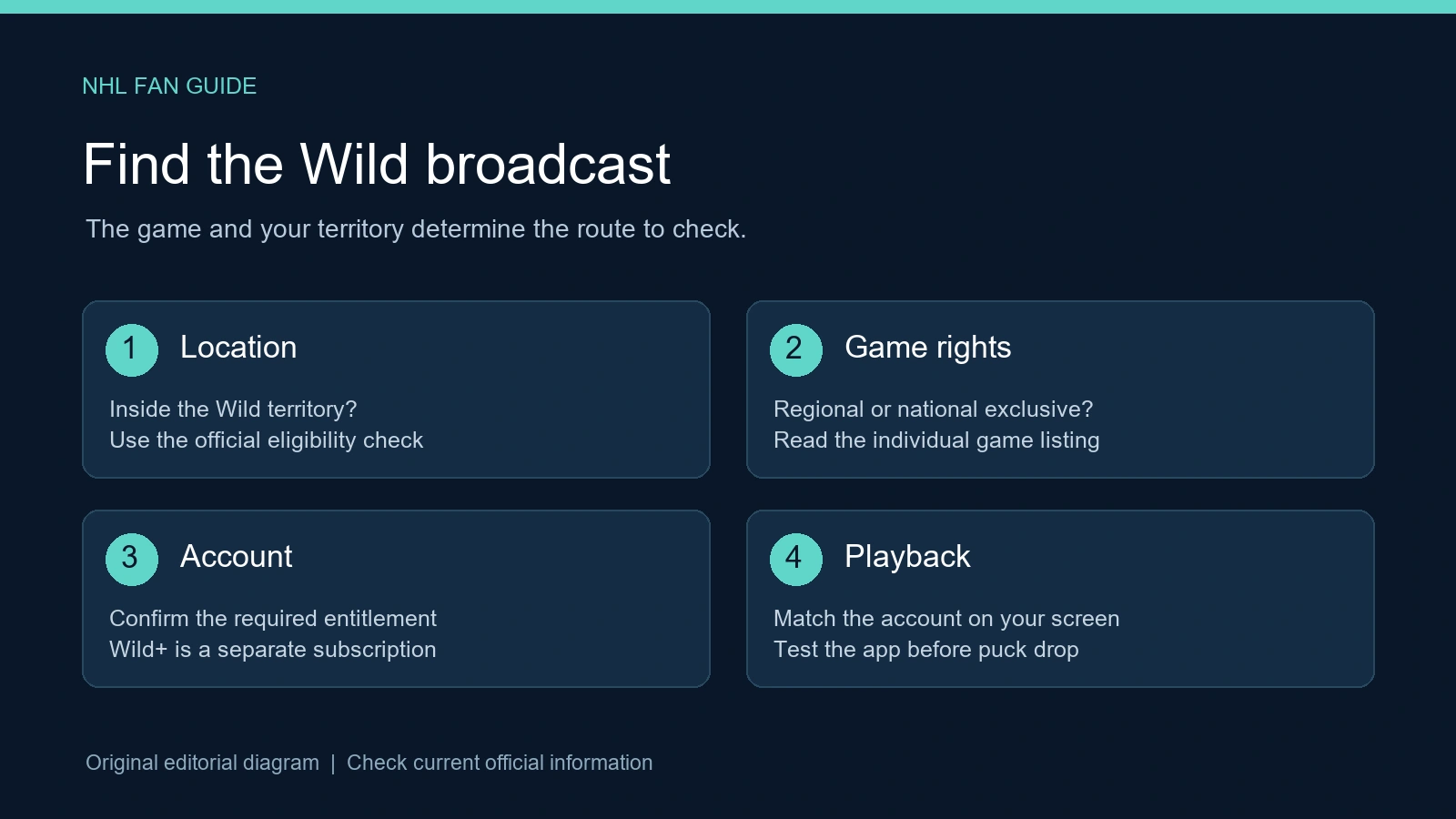
For example, imagine two fans watching the same Minnesota matchup. One is eligible for the local service and the other lives outside the participating teams' local areas. The first should check the regional listing; the second should check the licensed out-of-market service. If the game is a national exclusive, both may need the nationally assigned option in their country. The hockey is the same, but the access question is different.
A useful household plan separates what you already have from what you still need. Write down your current television provider, any streaming subscriptions, the screen you want to use and how many Wild games you expect to watch. That helps you compare a focused hockey add-on with a larger television package. It also prevents paying twice simply because several apps display the same team name.
Finally, check today's NHL listings near puck drop. Use them as a quick fixture check, then follow the authorized broadcaster's own event information for access. A current game listing and a current entitlement belong together.
Wild+ on Prime Video: what to buy and what to check
Wild+ on Prime Video is a local hockey subscription. The team's September 2 announcement published prices of $19.99 monthly or $99.99 annually. Those figures were still shown in the official FAQ when checked October 11. Confirm the actual checkout amount and terms before paying; an announcement price does not establish taxes, promotions or the renewal conditions of your purchase.
A Prime account and a Wild+ subscription are different
A paid base Amazon Prime membership does not include Wild+. The team says a free Amazon account can be used to purchase the separate Wild+ subscription, with no paid Prime membership required. That resolves a common point of confusion: Prime Video is the place you watch, while Wild+ is the specific hockey entitlement you buy.
Before subscribing, use the official territory check. The Wild's FAQ says eligibility depends on the billing ZIP associated with the payment method on the Amazon account. Do not assume a Minnesota mailing address, a favorite team selection or a particular television device settles eligibility by itself. If the service rejects your location or billing information, ask the authorized service to clarify the result before buying a different package.
Sign into the same account on the viewing screen that holds the subscription. Families often have more than one Amazon account, and an app can be signed into a different one without making that obvious. Check the subscription record and the account identity first. Repeatedly buying the add-on from another account can create duplicate charges without solving the original access problem.
Compare monthly and annual costs with your viewing plans
At the published prices, five monthly payments total $99.95, almost the same as $99.99 annually; six total $119.94. This arithmetic is a starting comparison, not a claim that the two purchases have identical terms. Check what the annual period covers, whether either plan renews automatically and what happens when you cancel. Do not infer a refund or a pause option from the word “monthly.”
If you will watch only a short stretch, a monthly arrangement may fit the plan better. If you expect to follow regional games across the season, compare the annual offer with the total monthly amount for that span. In either case, leave room for nationally exclusive games requiring other access. A regional subscription can be good value for your chosen games without being a complete replacement for every hockey channel.
Save the confirmation and renewal date after checkout. Test the app before the next game, and verify that the Wild event opens under the purchased account. Price, territory and playback are three separate checks; doing all three makes the first viewing night much easier.
Comcast and other providers: verify carriage before changing plans
For Comcast viewers, the relevant question is whether Xfinity TV carries the Wild's regional broadcasts. In an October 7 Xfinity support thread, official employees said there was no agreement to carry Wild+ or the team's local games as of October 2026. This guide was checked on October 11; a later agreement would require checking the updated provider lineup.
A regional sports fee or an expensive television package does not answer that carriage question by itself. Ask support about Wild+ by name, with your service address and package. A reply that the plan contains sports channels is too general: a channel carrying some sports may have no rights to the regional Wild game you want. Request the actual channel and availability for the specific broadcast.
Also separate your internet connection from your television subscription. Using Comcast internet to open a separately purchased stream is a different arrangement from expecting Xfinity TV to carry a regional channel. The fact that a streaming app loads on your device does not show that the television provider includes its paid subscription. Check the streaming entitlement and its territory independently.
There are confirmed alternative distribution announcements. The Wild announced a territorial Spectrum agreement on September 23 and a Fubo agreement on September 28. These announcements identify options to investigate, rather than a reason to assume every package from either company contains the games. The current service address, plan and lineup still need to match the regional broadcast.
Before changing providers, make a small comparison around the games you actually watch. Confirm Wild+ carriage, the national channels you need, supported devices and the full recurring price. A plan that solves one local game can still leave a later nationally assigned game on a different service. Switching television providers is a larger decision than buying access to a single game.
If the missing game is nationally televised, check that national channel first. It is possible to receive a national Wild broadcast while the regional carriage issue remains unresolved. Conversely, a national channel in the package does not supply the team's regional schedule. Save the support response and its date so you can recognize an actual change later, rather than treating an old answer or fan rumor as a new agreement.
Local television and selected over-the-air games
A television route can be convenient when you already subscribe to a provider that carries the regional broadcast. Confirm the channel in your own lineup and try it before puck drop. A provider-wide announcement and your household's package are related but different pieces of information; the agreement does not tell you which button to press on every receiver.
Selected games also have an over-the-air route. The Wild's October 1 announcement identifies ten regular-season broadcasts on KSTP-TV, 5 Eyewitness News, and KSTC-TV, 45TV. It describes a selected package, rather than the entire season being free on antenna television.
Check the station for the specific broadcast
The station assignment is as important as the date. KSTP and KSTC are different channels, so finding one in a television's channel scan does not establish that tonight's game is on that one. Open the team's broadcast schedule and match the game, station and local start time. Then compare it with the station's current listing, especially if you saved an older schedule image.
With an antenna, test actual reception at the television you will use. Building position, antenna placement and the receiving equipment can affect the result. A broadcast being available over the air in a market does not guarantee every household receives it cleanly. Testing a channel before the game gives you time to change placement or choose another licensed option.
A channel carried inside a paid television package and an antenna signal are also separate methods of reception. The same station name can appear in both places, but access through one method does not require that the other is working. Identify how you intend to receive it before asking support to troubleshoot an app you do not need for that route.
For a household combining options, mark the antenna games separately from regional subscription games and nationally assigned games. This makes the subscription decision more concrete: a selected free broadcast can cover one evening while other evenings still require a service you can receive. The weekly schedule helps organize dates; the official broadcast assignment supplies the channel.
National games and watching outside the Wild territory
A regional subscription is designed around regional rights. When a Wild game has a national assignment, start with that assignment rather than expecting the local package to replace it. A service successfully showing the previous game is not proof that it carries the next game, because the rights can change from one fixture to another.
For U.S. out-of-market regional viewing, the NHL viewing guide points to ESPN+ and NHL Center Ice, with selected NHL Network games excluded from ESPN+. That exception matters when an out-of-market game appears on a different national channel.
The ESPN NHL plan page identifies NHL PowerPlay in both Select and Unlimited packages, subject to blackouts and restrictions. It separately describes live ESPN/ABC access through Unlimited or eligible television-provider activation. A plan containing out-of-market hockey and a plan containing the live ESPN channel are therefore not interchangeable descriptions.
Consider a Wild fan living near a different NHL team. Being outside Minnesota's local territory does not necessarily make every Wild game available through the same out-of-market route. When Minnesota plays the viewer's local team, that opponent's regional rights can become relevant. The game, the viewer's location and the channel assignment all have to be considered together.
Likewise, a Minnesota household seeing a local blackout message should first check the local licensed broadcast. Buying an out-of-market package does not convert a local viewer into an out-of-market viewer. A restriction can reflect where the game is licensed rather than a broken account or television. Reinstalling an app will not change the broadcast rights for the household.
Outside the United States, use the NHL's country-specific viewing guidance. A U.S. package name or an American social-media recommendation does not establish access in Canada or elsewhere. Verify the licensed option for the country where you will watch, especially before travelling, and check whether live games rather than only replays are included.
For a broader comparison across U.S. games, the site's 2026-27 NHL viewing guide explains the national and regional split. Apply it to the particular Wild game; a broad hockey package label is less useful than confirming tonight's broadcaster and your entitlement to it.
A game-night checklist when the stream will not open
When the game will not play, begin by identifying what you expected to receive. Write down the matchup, broadcast assignment, viewing location and service. “The Wild stream is broken” can describe several different problems, and each needs a different response. A missing regional channel is not the same problem as a subscribed stream that buffers.
First check the account and entitlement. Make sure the account on the television is the one that purchased the relevant subscription. An active base membership alone does not show an active Wild+ add-on. Confirm the add-on in the account's subscription settings rather than purchasing it again on another account just because the television offers a buy button.
Then check carriage and rights. If Wild+ does not appear in the television lineup, ask the provider whether the service address and package include it. If the game is listed but restricted, compare the restriction message with the game's national or regional assignment. A stream can be functioning correctly while the household lacks rights to that particular live game.
If the entitlement and game assignment match, describe the playback failure precisely. Does the app open? Does the live tile appear? Is there an error code, a black screen or repeated buffering? Record the device model, app version and whether another supported device produces the same result. These observations help support distinguish an account-wide issue from a problem on one television.
Use the service's current signed-in support for device instructions. The Prime Video help gateway provides account and playback help categories. Instructions and available services can vary by region, so select the correct country and account context. Avoid assuming a generic troubleshooting page changes a Wild broadcast restriction.
Finally, plan the next game before the next urgent error. Put the date in the NHL calendar, confirm the assigned broadcaster, and test the appropriate channel or account early. This is particularly useful for households moving among antenna games, regional subscriptions and national services. The reliable path is the one that matches the game's rights and your location, with a working entitlement on the device you will actually use.
Comments
Comments are reviewed before publication. Spam, abusive content and policy-violating links are not published.
Sign in with Google to leave a comment.
Loading comments...