Start with NHL.com, the league's official YouTube channel, or an official broadcaster channel such as Sportsnet or NHL on ESPN. Choose the format before searching: one play, a short recap, a condensed game or analysis. This guide explains how to find the right clip and watch it comfortably; it is not a changing list of today's videos. Sources and platform information were checked on October 11, 2026.
Choose the highlight format that fits your time
The NHL video directory separates highlights, five-minute recaps and condensed games. Start by deciding what you want to learn. A goal clip answers what happened on one play. A recap helps you follow an edited game story. A longer edit gives you more context, while a complete replay is a different viewing commitment.
A single play or a short game recap
If a friend mentions an unusual goal or a great save, search the player, both teams and the game date. That is usually more useful than typing only NHL highlights. A single-play clip can be the quickest route to the moment, but it does not explain the whole game. Notice the scoreboard and game clock within the clip so you understand where the play occurred in the contest.
For a game you missed, open the five-minute recap category. Read the displayed runtime rather than expecting every upload to last exactly five minutes. The category name is a useful format label, not a stopwatch guarantee. If you have only a few minutes, one complete recap is often more satisfying than several disconnected goal clips.
Search wording matters here. A search for game five highlights can return the fifth game of a playoff series rather than a five-minute edit. Add recap, the matchup and the date when duration is your goal. Conversely, if you really want Game 5 of a series, add the playoff year and both clubs so a regular-season clip does not crowd out the result.
Condensed games are different from full replays
The NHL also maintains a separate condensed-game category. Check its runtime and compare it with the shorter recap. If the short edit leaves you wondering how a chance developed, a longer edit may be a better next step. It still represents a selection of action rather than every shift and stoppage.
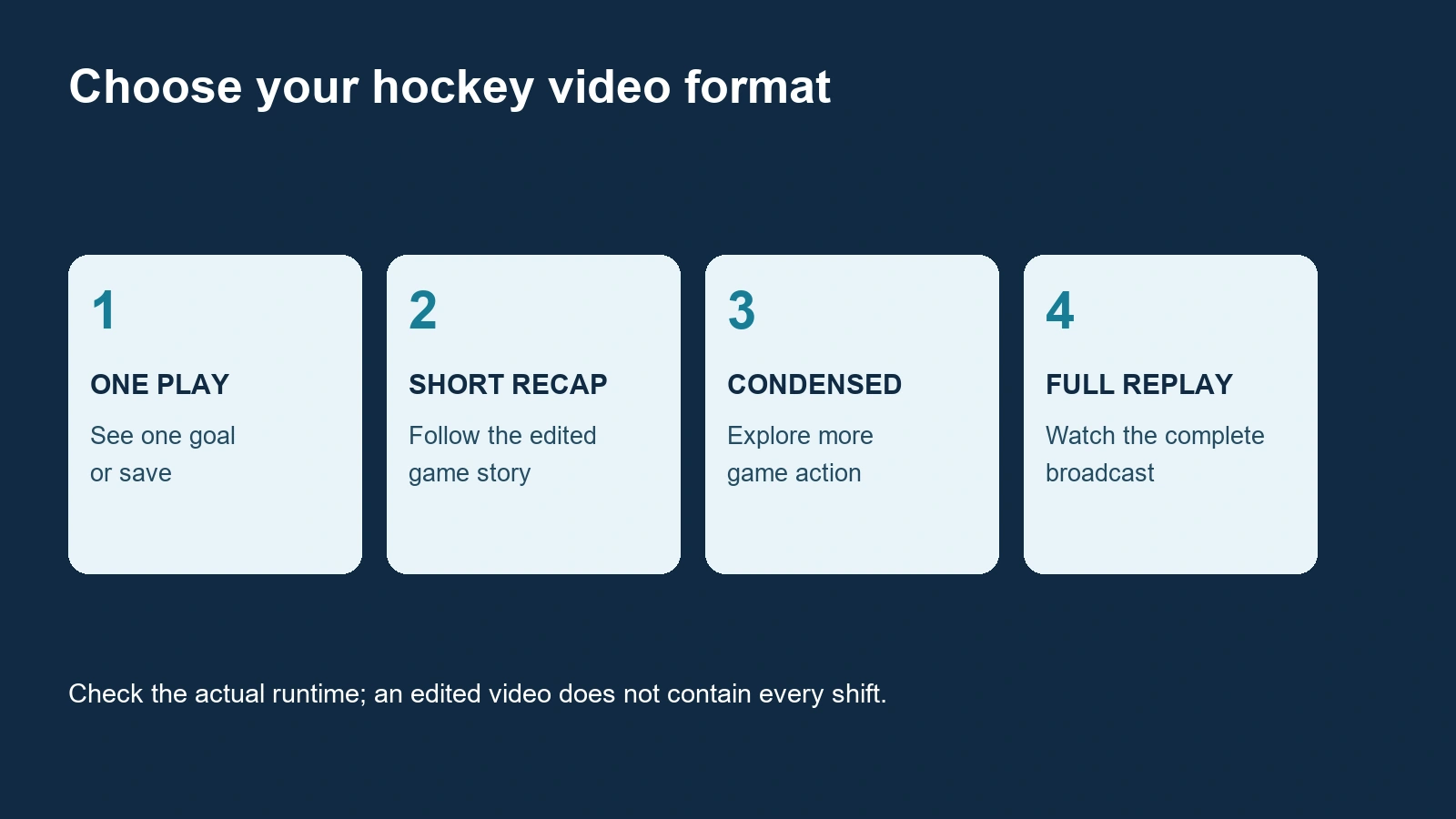
For tactical viewing, remember that an edited video can skip the quiet possessions, line changes and unsuccessful entries that shape a game. Do not conclude that a team controlled an entire period just because its best chances dominate a short compilation. Use highlights to identify moments worth revisiting, then choose a longer viewing format if you want to assess the broader performance.
If you want the entire broadcast, use our full-game NHL replay guide. A short public upload does not prove that the full game is available in the same place. Keeping those tasks separate saves time: pick the clip length that fits your break, and investigate a replay only when the extra context is what you actually want.
Find official NHL and team uploads on YouTube
The official NHL YouTube channel is a useful starting bookmark. Enter through the publisher's own website or a saved official channel link when you want to avoid sorting through similarly named accounts. A hockey-themed avatar and a familiar clip title alone do not identify the uploader.
On a channel page, distinguish its videos, Shorts and playlists. The same moment may appear in more than one format, and a vertical short is not necessarily a complete game recap. Read the runtime and description before pressing play. If you want a landscape video for your television, opening the regular video listing can be more comfortable than scrolling through short vertical clips.
Search with both team names and the date the game was played. For example, use the structure Bruins Flyers highlights plus the actual game date you are looking for. The structure is the important part; do not substitute an upload date automatically. A late game can be posted the following day, particularly when your viewing time zone differs from the arena's.
YouTube's advanced search filters let you refine results by content type, including videos, playlists and channels. If a broad query mixes interviews, compilations and individual plays, choose the result type that matches your task. Then inspect the uploader and matchup rather than assuming the first result is the newest or most complete edit.
A team's own video section is another useful route. The Bruins video page, for example, separates game highlights and interviews. For your club, begin at its official website and follow its video or social links. That can help you find the team's perspective on a play or hear a player's explanation after the game.
Keep that perspective in mind when comparing clips. A team-produced moment can be exactly what you want when following a particular player, but it is not necessarily an even-handed summary of every chance. If your question is how both sides played, look for a game recap and compare its scope with the single-team feature. You do not need to watch the same goal five times to learn more about the contest.
Use the NHL game listings to establish the matchup and date, then search the official publisher. If a new recap is not visible, check again later or try another authorized publisher. There is no dependable universal upload deadline in this guide. A search result can also resurface an old meeting between the same teams, so verify the year before sharing it as the latest game.
Compare Sportsnet, ESPN and other broadcaster clips
Official broadcaster uploads give you another route when the league's edit is not the format you want. Compare what the video promises: game highlights, one player moment, a studio discussion or an interview. Those labels matter more than choosing one publisher for every situation. A broadcaster's channel can contain several kinds of hockey coverage beside other sports.
Sportsnet game highlights
Sportsnet has an NHL Game Highlights category and an official YouTube video page. These are useful places to check for an edited matchup video. Confirm the teams, year and runtime on the upload rather than assuming every Sportsnet result is a recap of the game you missed.
When two publishers carry an edit of the same game, choose one complete recap first. If you still have a specific question, compare the relevant moment in the second version. Different edits can emphasize different chances or include different commentary. Watching both can be helpful, but counting repeated clips as additional game context can give a misleading sense of how much of the contest you have seen.
If the Sportsnet website player does not load on your device, try the official publisher's platform upload when one is available. Read any territorial or availability message rather than assuming a failed player means all its clips are unavailable. A browser issue, a missing upload and a country restriction are different possibilities. The alternate route should still identify Sportsnet as the uploader.
ESPN analysis and other video hubs
The NHL on ESPN channel is another official starting point. Read the format before watching: a player feature or a studio discussion may explain a moment without functioning as a balanced game recap. If you want the play itself, search the matchup and player. If you want why it mattered, the analysis format may be the better choice.
TSN's NHL video hub provides another publisher directory. Use it as an additional source, not a promise that every game or every clip will play in every country. Follow the message attached to the actual video. It is sensible to keep a few official bookmarks so you can compare formats without repeatedly searching the entire web.
Short clips and paid live broadcasts are separate products. The ability to play an official public upload does not unlock a broadcaster's live channel, and following a YouTube channel does not purchase its television package. If your real goal is the next live game, switch tasks and consult our NHL live-viewing guide. That prevents a highlights search from becoming an unnecessary subscription purchase.
Watch highlights comfortably on your TV or phone
Choose the screen around what you want to see. A phone is convenient for one goal during a short break, while a television or tablet can make a wide rink view easier to follow. If the puck is difficult to see, try a larger screen or a clearer available video setting before assuming the clip itself contains too little detail.
YouTube's television connection guide explains casting and TV-code linking on supported setups. Open the official YouTube app on the television and use the route that fits your devices. When using the phone as a companion, check that the account matches the television account. YouTube TV is a separate service from watching an ordinary YouTube upload.
Search and select the clip on the device where typing is easiest, then move it to your supported television setup. This can be simpler than entering two team names and a date with a remote. Confirm that the transferred video is the same upload you selected, especially if a playlist or another recommended video starts automatically afterward.
Use playback and caption controls when available
YouTube's quality settings depend on the upload, device and viewing conditions. Select an available quality that stays clear without repeated buffering. A higher-resolution display cannot guarantee a higher-resolution source video. On mobile data, consider your data allowance as well as image quality before watching several longer recaps.
For a fast passing play, watch once at normal speed to understand its rhythm, then revisit the relevant moment. Where available, playback-speed controls can help you slow the video. These controls are not offered identically on every smart television. Slowing a clip can help you see a pass or deflection, but it should not replace checking whether the action was continuous or edited.
If captions are offered, the caption controls can make commentary easier to follow in a quiet setting. Check player names and hockey terms carefully rather than treating every caption as a verified transcript. When a disputed explanation matters, replay the audio or consult the publisher's accompanying description.
Finally, separate a video problem from a discovery problem. A clip that buffers needs a playback or connection check; a clip from the wrong year needs a better search. If only one upload is unavailable, read its notice and try another official source for the same moment. Keep the matchup and format in mind instead of repeatedly opening unrelated recommendations.
Build a quick hockey catch-up routine
A good routine starts with a time budget and a question. If you have five minutes, pick the game you care about most and watch one short recap whose displayed runtime fits. If you have ten minutes, choose a longer edit of that game or two shorter recaps. If you have twenty minutes, add a relevant analysis segment after the action. These are planning examples, not guarantees about the length of any publisher's next upload.
Make the first video count. A recommendation feed can easily send you from an old spectacular goal to another unrelated compilation. That can be enjoyable, but it is a different goal from catching up on the previous evening's hockey. Search the selected matchup first, finish that recap, and then decide what additional question remains.
For a team-focused routine, begin with the latest game date and one complete edit. Add an interview only if you want the player or coach's explanation. For a league-wide routine, choose a few matchups that matter to the standings or your interests rather than trying to watch every repeated goal from every publisher. Use the week's NHL schedule to keep track of which games you have already followed.
YouTube's Watch Later feature can hold clips for a later break, where that save option is available. Save the specific official upload rather than repeating the same broad search each time. Remove videos after viewing if you want the list to remain a useful queue instead of a growing archive you never revisit.
For a recurring topic, a personal playlist can be useful. Follow YouTube's playlist instructions and give it a clear purpose, such as your team's recaps or goalie technique examples. Keep a technique collection separate from a latest-game queue so an old clip does not become confused with a new result.
Highlights are generally designed around notable outcomes. Titles, thumbnails, descriptions and scoreboards can reveal what happened before you finish watching. If preserving uncertainty matters to you, do not treat a highlights directory as a guaranteed spoiler-free route. Choose your viewing format deliberately, and remember that a compilation can reveal the decisive play even when its title is vague.
When sharing a moment, send the official upload link and identify the matchup or player. That gives a friend the same source and context you watched. Public availability does not automatically grant permission to download and republish the footage. The simple fan routine is to find the right publisher, verify the game and format, watch the clip that answers your question, and save only the next item you actually want to see.
Comments
Comments are reviewed before publication. Spam, abusive content and policy-violating links are not published.
Sign in with Google to leave a comment.
Loading comments...